Read your script. Keep your eyes on the camera.
Tuzu is a teleprompter you can use two ways: free in your browser, with no sign-up, or as an app that scrolls your script over the camera on iPhone and iPad while you record.
- No account needed
- Mirror mode for glass rigs
- Webcam recording, nothing uploaded
Two ways to use Tuzu
Same idea, different camera. Choose by where you record.
Online teleprompter
For laptop and desktop webcams, video calls, and teleprompter glass driven by a tablet or computer.
- Pace set in words per minute, adjustable mid-read
- Horizontal and vertical mirror, countdown, reading line
- Record with your webcam and save the file locally, without a watermark
- Script saved in your browser only
Tuzu app
For selfie-camera videos: vlogs, YouTube, Shorts and Reels, course clips and video messages.
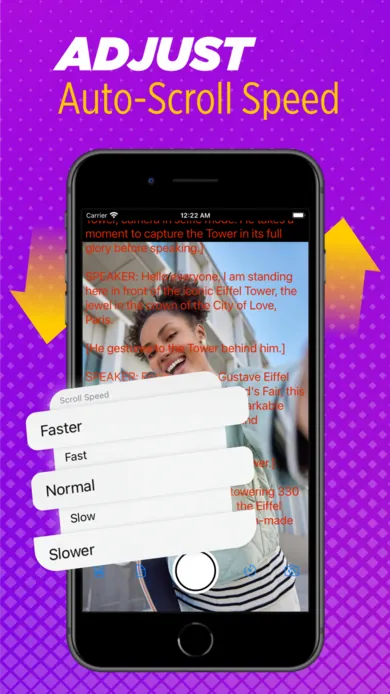
- Script scrolls over the front camera while you record
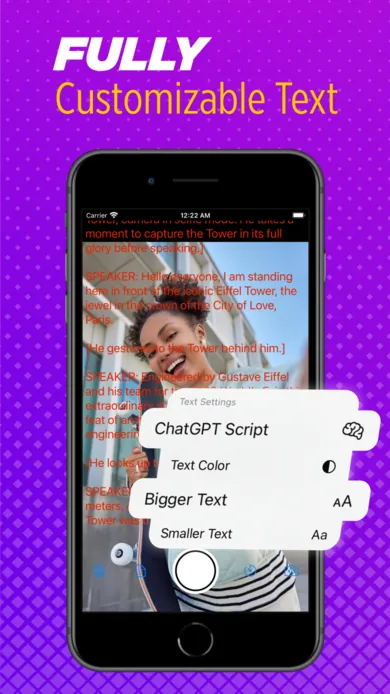
- Five scroll speeds, text size and text color
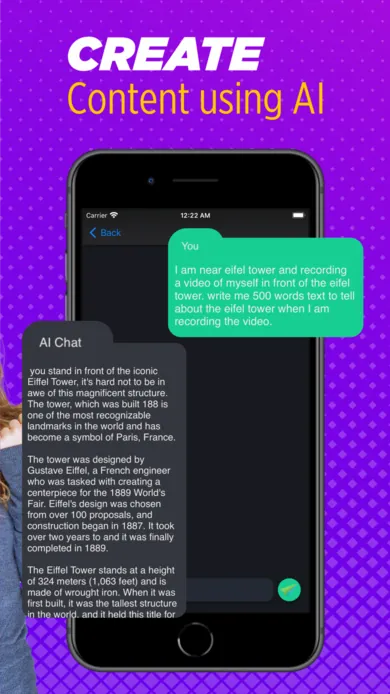
- AI script writing built in (ChatGPT-based)
- Free download; Pro unlocks recordings longer than one minute

What a teleprompter fixes
You know what you want to say. The camera makes it harder to say it.
Fewer retakes
No more stopping halfway because you lost your place. The words are in front of you, at the pace you set.
Eye contact
Reading notes off to the side makes your eyes dart. Text placed at the lens keeps your gaze where viewers expect it.
Predictable length
Know a script runs 2:10 before you record it, so it fits a Short, an ad slot or a meeting agenda.
Record while you read, on the phone you already have
Type or paste your script, or ask the built-in AI to draft one. Press record and the text scrolls over the live selfie view, so you can read it while looking into the lens. Change speed, size and color to suit the room and your eyesight.
- Scroll speeds from Slower to Faster
- Custom text color and size
- Videos saved to your device, ready to share
Find the setup for what you record
Learn the craft
Short, practical guides written for people who've never used a teleprompter.
Frequently asked questions
What is a teleprompter?
A teleprompter shows a script that scrolls while you speak, placed as close as possible to the camera lens so you can read and still look at your audience. Professional versions use angled glass in front of the lens; apps and browser tools put the text on a screen next to, or over, the camera image.
Is Tuzu free?
The online teleprompter is completely free with no account. The iPhone and iPad app is a free download; free users can record videos up to one minute, and a Pro subscription (sold in the App Store) removes that limit. Prices are shown in the App Store before you buy.
Does the Tuzu app work on Android or Mac?
The app is available for iPhone and iPad (iOS/iPadOS 15.4 or later). On Android, Mac, Windows or Chromebook, use the online teleprompter in your browser.
Can I record video with the online teleprompter?
Yes. Turn on the camera inside the teleprompter to see yourself behind the text, then press record. The video is saved straight to your device; it is never uploaded to us.
What languages does the app support?
The app's interface is in English. You can paste a script in any language your device can display. The online teleprompter displays any text your browser can render.
Ready when you are
Open the free online teleprompter now, or download Tuzu to record with your script over the iPhone camera.
